When businesses shop for an interactive flat panel, most focus on screen size, resolution, and price. Very few ask about the operating system — and that is a mistake that costs them dearly within 12 to 18 months of purchase.
The operating system is the brain of your interactive panel. It determines how fast it runs, which apps it supports, how secure it is, and how long the device remains useful before it starts feeling outdated. In 2026, the benchmark for interactive flat panels in India is Android 14 — and if the panel you are considering runs anything older, you should think carefully before buying.
This blog explains exactly what Android 14 brings to interactive flat panels, why it is a meaningful upgrade over older versions, and why it matters specifically for Indian businesses using PeopleLink and TrueView panels from Raise Solutions in Vijayawada.
A Quick History — Why Android Version Matters on a Panel
Interactive flat panels started running Android operating systems around 2016–2017, when manufacturers realised that building a full computer inside the panel — rather than relying on an external laptop — would dramatically improve usability.
Early panels ran Android 5 and Android 6 — versions that were already outdated on smartphones. The result was slow, laggy panels that struggled to run modern apps and received no security updates within a year of purchase.
The market gradually moved through Android 8, Android 9, Android 11, and Android 13. Each version brought meaningful improvements. But Android 14, released in 2023 and now shipping in 2026-era interactive panels, represents the most significant leap in performance, security, and business-readiness the platform has seen.
When you buy a PeopleLink or TrueView interactive panel from Raise Solutions today, Android 14 is what powers it — and here is exactly what that means for your business.
What Is New in Android 14 for Interactive Panels
1. Dramatically Improved Performance and Multitasking
Android 14 introduces a rebuilt process management engine that handles multiple apps simultaneously with far greater efficiency than its predecessors. On an interactive panel paired with 8GB RAM — as found in PeopleLink and TrueView models — this translates to a genuinely smooth experience when running multiple tasks at once.
In real-world business use, this means you can have a Zoom call open on one side of the screen, a presentation running on the other, a browser tab open in the background, and a whiteboard session saved and accessible — all without the panel slowing down, freezing, or asking you to close apps.
On panels running Android 9 or Android 11, this level of simultaneous operation would cause noticeable lag. On Android 14, it is fluid.
For businesses that use their interactive panel heavily throughout the day — back-to-back meetings, training sessions, client calls — this performance improvement is immediately felt from day one.
2. Stronger Security — Enterprise-Grade Protection Built In
Security is the most underappreciated upgrade in Android 14 for business users.
Android 14 introduces several enterprise-security features that were previously only available through third-party device management tools:
Health Connect API integration — tighter control over what data apps can access from the device.
Photo and Video Permission Granularity — apps can no longer access your entire media library. They can only access the specific files you explicitly permit them to use. On a shared boardroom panel where multiple employees log in, this significantly reduces the risk of sensitive files being accessed by unauthorized apps.
Improved Credential Manager — Android 14 replaces the fragmented password and passkey system of older versions with a unified credential manager that works across all apps. For businesses where employees log into cloud platforms, CRMs, and collaboration tools directly from the panel, this makes secure login faster and more consistent.
Enhanced App Permission Controls — apps must now declare exactly which permissions they need at install time, and users can grant or deny each one individually. This prevents the kind of blanket permission grabs that older Android versions allowed.
Regular Security Patch Cadence — Google committed to monthly security patches for Android 14 devices through 2027. On a panel running Android 9, security patches stopped years ago — leaving the device vulnerable to known exploits. On Android 14, your panel stays protected.
For businesses in sectors like finance, healthcare, legal services, and government — where data security on shared devices is non-negotiable — Android 14 is not a nice-to-have. It is a requirement.
3. Better App Compatibility — The Full Google Play Store
Android 14 with Google EDLA (Enterprise Device Licensing Agreement) certification — which PeopleLink and TrueView panels carry — gives you access to the complete, verified Google Play Store.
This matters more than most buyers realise.
Many interactive panels on the Indian market run uncertified versions of Android — meaning they use the open-source Android base without Google’s approval. These panels cannot access the official Play Store, cannot install Zoom, Teams, or Google Meet from official sources, and cannot receive verified app updates. Buyers discover this after purchase, often when they try to set up a video call and find the app version available is months or years out of date.
On an Android 14 EDLA-certified panel, every app you install comes from the official Play Store with full Google verification. This means:
- Zoom — latest version, with all meeting features including AI companion
- Microsoft Teams — full desktop-equivalent experience
- Google Meet — integrated with Google Calendar and Workspace
- Canva — full design and presentation tool
- Google Slides, Sheets, Docs — complete Google Workspace
- Any industry-specific app your business uses — CRM, ERP dashboards, training platforms
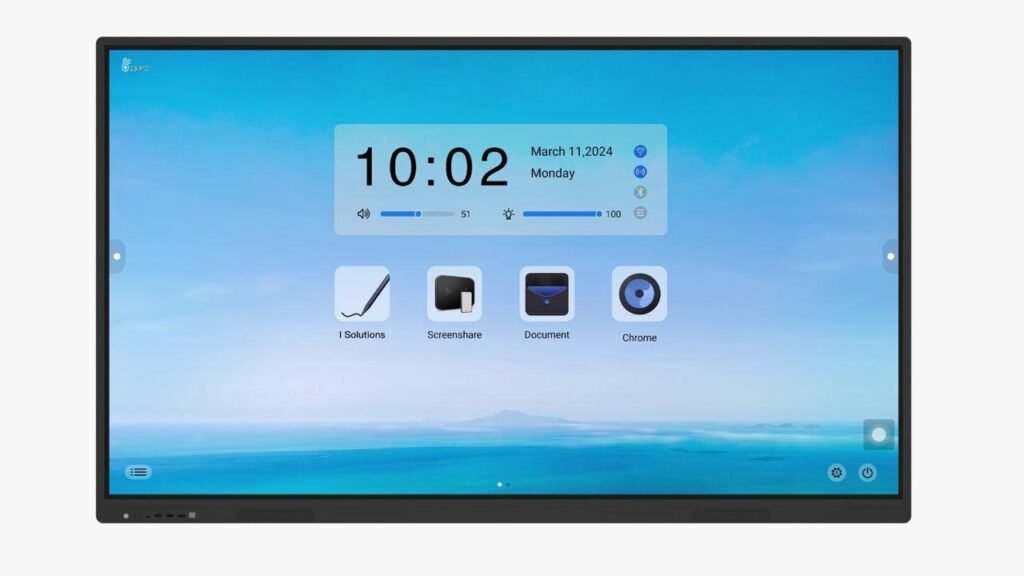
The app ecosystem on Android 14 EDLA is essentially the same as what you use on your Android smartphone — just on an 86-inch screen with 40-point touch.
4. Improved Wireless Casting and Screen Mirroring
One of the most common frustrations with older interactive panels in Indian offices is wireless screen casting — connecting a laptop or phone to the panel without cables.
Android 14 brings significant improvements to the Miracast and Android Cast protocols, resulting in:
- Lower latency — the delay between what is on your laptop and what appears on the panel is reduced to near-real-time. On Android 9 panels, this lag was often 1–3 seconds — noticeable and distracting during presentations.
- Stable connections — Android 14 handles WiFi interference and network handoffs far more gracefully, meaning fewer dropped connections in the middle of a presentation.
- Higher resolution casting — Android 14 supports casting at full 4K resolution, meaning your 4K laptop display appears at full quality on the panel. Older Android versions capped wireless casting at 1080p or lower.
- Multi-device casting — multiple team members can queue their screens for casting without the panel needing a restart between connections.
For an Indian office where 5–10 people each need to share their screen during a meeting, these improvements collectively save significant time and eliminate a major source of meeting-room frustration.
5. AI Integration at the OS Level
Android 14 is the first Android version to integrate AI assistance at the operating system level — not just as an add-on app, but as a core part of how the panel functions.
On an interactive panel, this manifests in several ways:
Intelligent Handwriting Recognition
When you write on the whiteboard with your finger or stylus, Android 14’s built-in AI engine recognises your handwriting in real time and offers to convert it to typed text. This is particularly useful for meeting notes — write freely on the board during the meeting, then convert to a clean typed document and share via email before you leave the room.
Smart Auto-Framing for Video Calls
Connected cameras on Android 14 panels benefit from AI-powered auto-framing — the camera automatically adjusts to keep all participants in frame as people move around the room. No more manually adjusting the camera when someone stands at the whiteboard.
Noise Cancellation
Android 14’s audio stack includes AI-powered background noise suppression. In a busy office environment — air conditioning noise, keyboard sounds, background conversations — the microphone feed is automatically cleaned before it reaches remote participants on a video call.
Predictive App Loading
Android 14 learns your usage patterns. If your team always opens the whiteboard app at 9 AM and Zoom at 10 AM, the panel begins pre-loading these apps in the background — so they open instantly when you need them. On older Android versions, opening a heavy app like Teams from cold could take 15–30 seconds.
6. Better Customisation for Business Environments
Android 14 gives IT administrators and business owners significantly more control over how the panel behaves in a shared professional environment.
Kiosk Mode — lock the panel to a single app or a curated set of apps. Ideal for reception displays, training rooms, or client-facing panels where you do not want employees or visitors accessing the full Android environment.
Multi-User Profiles — different employees can have their own login on the same panel, with their own apps, settings, and files. Switch between profiles in seconds. Particularly useful in training rooms and shared meeting spaces where different departments use the same panel.
Managed Home Screen — configure a clean, professional home screen with only the apps your business uses. No clutter, no confusing settings, no accidental changes by unfamiliar users.
Remote Device Management (MDM) Support — Android 14 works seamlessly with Mobile Device Management tools. IT teams can push app updates, change settings, and troubleshoot the panel remotely — without physically visiting the meeting room. For businesses with multiple panels across multiple floors or locations, this is a significant time and cost saving.
7. Enhanced Display and Touch Performance
Android 14 introduces improvements to how the operating system communicates with the display hardware — resulting in tangible improvements to what you see and feel:
120Hz Smooth Rendering — Android 14 supports high refresh rate rendering, meaning scrolling, animations, and transitions appear smoother on compatible panels. Writing on the whiteboard feels more natural — the ink appears to flow from your fingertip without any perceptible delay.
Improved Palm Rejection — when you rest your palm on the screen while writing with a finger or stylus, Android 14 is significantly better at ignoring the palm contact and only registering the intended input. On older Android versions, palm contact would create accidental marks on the whiteboard — frustrating during detailed drawing or annotation.
Variable Refresh Rate Support — Android 14 allows the panel to run at a lower refresh rate when displaying static content (like a paused presentation slide) and ramp up to full speed during interactive use. This reduces power consumption without any perceptible quality difference — a meaningful consideration for panels running 8+ hours per day.
8. Longer Useful Life — Future-Proofing Your Investment
An interactive flat panel is not a disposable purchase. It is a significant capital investment that a business expects to use for 5–8 years.
The operating system version at purchase directly determines how long the panel remains relevant.
A panel bought in 2024 running Android 9 is already running an OS that Google stopped supporting with security patches in 2022. By the time you bought it, it was already two years into obsolescence. Within 12–18 months of purchase, major apps began dropping Android 9 support, and the panel started struggling to run the latest versions of Zoom and Teams.
A panel running Android 14 in 2026 sits on an operating system that Google will support with security patches through at least 2027–2028, and with Android 15 updates potentially available through upgrade pathways on certified hardware. Apps will continue receiving full Android 14 support for 3–4 more years at minimum.
For a business buying a PeopleLink or TrueView panel from Raise Solutions today, Android 14 means your panel will remain fully functional, secure, and app-compatible well into the early 2030s — genuinely earning back its purchase price over a long useful life.
Android 14 vs Older Android Versions — Side-by-Side
| Feature | Android 14 | Android 11 | Android 9 |
|---|---|---|---|
| Security patches | Monthly (until 2027+) | Ended 2024 | Ended 2022 |
| Play Store access (EDLA) | Full verified access | Partial | Limited |
| Multitasking performance | Excellent | Good | Poor |
| AI features | Built-in OS level | App-level only | Minimal |
| Wireless casting quality | 4K, low latency | 1080p, moderate lag | 720p, high lag |
| Palm rejection | Advanced | Basic | Minimal |
| Multi-user profiles | Full support | Basic | Not supported |
| MDM / Enterprise tools | Full support | Partial | Limited |
| Zoom / Teams latest version | Fully supported | Supported | Dropping support |
| Useful life from 2026 | 5–7 years | 2–3 years | Already outdated |
The difference is not marginal. In a professional environment where the panel is used every working day, the gap between Android 14 and Android 9 is the difference between a tool that makes your team more productive and a source of daily frustration.
Real-World Scenarios — Android 14 in Action
Scenario 1 — The Monday Morning Standup
Your team of 12 gathers in the conference room. Three people are working remotely. You open the whiteboard instantly — no boot time — write the week’s targets, open a Zoom call with the remote team from the same screen, and cast your project dashboard from your laptop wirelessly at full 4K quality. The entire setup takes 45 seconds. On an Android 9 panel, this sequence would take 4–6 minutes with multiple connection failures.
Scenario 2 — The Client Presentation
A client walks in for a proposal review. You open your Canva presentation directly on the panel from the Play Store — latest version, no compatibility issues. Midway through, the client asks to see a live demo of your product’s dashboard. You cast your laptop screen in 3 seconds. The client wants to annotate a diagram — they walk up and write directly on the screen with their finger. You save the annotated version and email it to them before they reach the car park.
Scenario 3 — The Training Session
Your HR team is running a compliance training for 20 employees. The trainer opens YouTube for a video module, pauses it, annotates directly on the paused frame to highlight key points, switches to a quiz app for a live poll, and then opens Google Docs to type a summary — all on the same panel without touching a laptop. Android 14’s multitasking handles every switch instantly.
What to Check When Buying an Android 14 Interactive Panel in India
Before finalising your purchase, verify these five points:
1. Confirm Android 14 — not Android 13 or older
Ask for the out-of-box OS version in writing. Some dealers still have older stock that ships with Android 11 or 13 and offers an “upgrade path” — which may or may not arrive.
2. Confirm Google EDLA certification
Ask for the EDLA certificate or verify on Google’s official EDLA device list. Without this, your Play Store access is restricted.
3. Check RAM — minimum 8GB for Android 14
Android 14 is designed to take advantage of higher RAM. On 4GB RAM devices, the performance benefits are partially negated. PeopleLink and TrueView panels come with 8GB RAM — the right pairing for Android 14.
4. Check storage — minimum 128GB
Android 14 itself, plus the apps, plus your stored content, adds up fast. 64GB fills within months. 128GB gives you meaningful headroom for 3–4 years of daily use.
5. Confirm onsite warranty coverage
A 3-year onsite warranty means a technician comes to your office. Verify this explicitly — not a carry-in warranty that requires you to transport an 86-inch panel to a service centre.
Where to Buy Android 14 Interactive Panels in Vijayawada
Raise Solutions is the authorised dealer for PeopleLink and TrueView interactive flat panels in Vijayawada — both brands running Android 14 with 8GB RAM, 128GB storage, 4K Ultra HD, 40 touch points, Google EDLA certification, AI features, and 3-year onsite warranty.
Available in 55″, 65″, 75″, and 86″ sizes.
EMI options available. Live demo available at the Experience Center before you commit.
Raise Solutions Experience Center
1st Floor, Pradham Building, beside Indian Oil Petrol Pump
Nidamanuru Road, Poranki-521137, Vijayawada, Andhra Pradesh
📞 94926 67817 | 85229 59096
🌐 www.raisesolutions.in
Conclusion
Android 14 is not a minor version bump. It is the operating system that finally makes interactive flat panels genuinely enterprise-ready for Indian businesses — with the performance, security, app compatibility, AI features, and longevity that a significant business investment demands.
When you buy a PeopleLink or TrueView panel running Android 14 from Raise Solutions, you are not just buying a screen. You are buying a future-proof collaboration platform that will serve your team productively for the next 5–7 years.
The operating system is the brain. Make sure the brain is up to date.
Published by Raise Solutions | Vijayawada’s Authorised PeopleLink & TrueView Dealer
94926 67817 | raisesolutions.in | Poranki-521137, Vijayawada