
You have seen it dozens of times. You place your bag on the conveyor belt at a court entrance, a hotel lobby, a shopping mall or an airport. The bag disappears into the dark tunnel. And on the monitor beside the security officer, a colourful image appears — patches of orange, green, blue and black layered over each other like an abstract painting.
What does it all mean? Why is your laptop dark blue while your lunch box is orange? Why does the security officer sometimes zoom in on a particular colour? And what exactly are they trained to look for?
This guide explains the baggage scanner colour code system completely — what each colour means, why the colours are used, how operators are trained to read them, and what the limitations of colour-based detection are.
Why Do Baggage Scanners Use Colour Codes?
Before explaining what each colour means, it is worth understanding why colour is used at all.
A raw X-ray image — before any colour processing — is a greyscale picture. Different materials absorb different amounts of X-ray radiation, and this differential absorption creates lighter and darker areas on the image. Dense materials like metal absorb most of the X-rays and appear very dark. Less dense materials like paper and food allow more X-rays through and appear lighter grey.
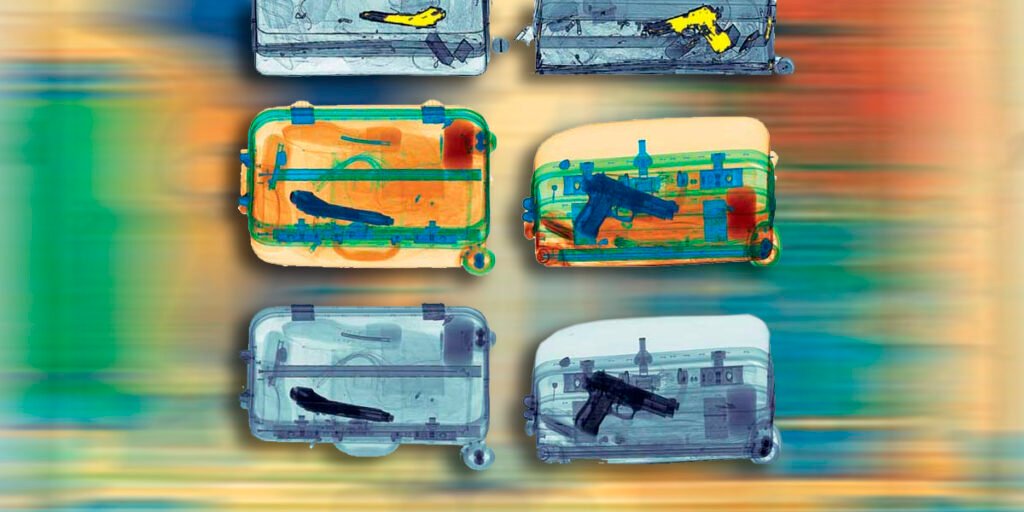
Greyscale images are functional — but they make it harder for operators to quickly distinguish between material types, especially when multiple objects are layered on top of each other inside a bag.
Colour coding solves this. The scanner’s computer processor analyses the absorption data for every pixel of the image and assigns a colour based on the material density and atomic number (the type of atoms in the material). The result is a colour-coded map of everything inside the bag — where each colour corresponds to a material category, not a specific object.
This allows a trained operator to scan the image in 3 to 5 seconds and immediately identify areas of interest — without having to mentally interpret every shade of grey.
The Standard Baggage Scanner Colour Code — What Each Colour Means
Different manufacturers use slightly different colour schemes. However, the international standard most widely adopted — and used across the majority of Indian security installations — follows this colour code system:
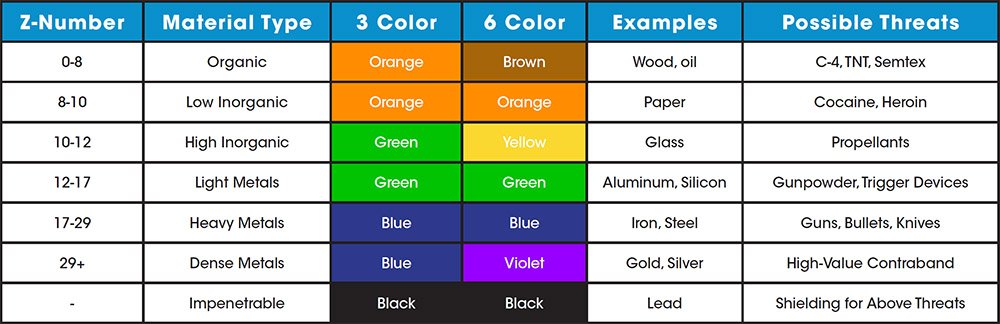
Orange — Organic Materials
What it means: Orange indicates organic materials — substances composed primarily of carbon, hydrogen, oxygen and nitrogen atoms.
What falls in this category:
- Food items — fruits, vegetables, cooked food, snacks, packaged food
- Paper — books, documents, newspapers, currency notes
- Wood and wooden items
- Most clothing and fabric
- Leather goods — wallets, belts, bags
- Plastic items — bottles, containers, pens, phone cases
- Rubber items
- Explosives — almost all explosive materials are organic in composition
- Narcotics and drugs — most controlled substances are organic compounds
- Tobacco and cigarettes
- Some adhesives and tapes
Why it matters for security: Orange is the most security-critical colour on the screen. While most orange items in any bag are completely harmless — food, clothing, paper — the fact that explosives and most drugs also appear orange means the operator must pay close attention to the shape, density and packaging of every orange mass in the image.
A block of explosive material appears orange. A thick book also appears orange. A trained operator distinguishes between them by shape, density uniformity, context within the bag and — in modern dual-energy scanners — by the precise atomic number reading within the organic range.
What operators look for in orange: Unusual rectangular shapes with uniform density (can indicate explosive blocks), suspicious packaging patterns, organic masses in unexpected locations (inside a shoe, behind a panel), orange items alongside triggering components.
Green — Inorganic Non-Metallic Materials
What it means: Green indicates inorganic materials that are not metals — substances that do not contain carbon as the primary element and are not metallic in composition.
What falls in this category:
- Glass — bottles, jars, glasses, screens
- Ceramics — mugs, plates, decorative items
- Some types of plastics with higher density than standard organic plastics
- Certain chemical compounds
- Silicon-based materials
- Some minerals and crystals
Why it matters for security: Green materials are generally considered lower security risk compared to orange or dark blue/black. However, operators are trained to note green areas that appear in unusual shapes or alongside suspicious orange or dark areas — for example, certain chemical compounds used in improvised devices may appear green.
Ceramic knives are worth noting here: they appear green rather than the dark blue or black of metal knives, which is why a standard door frame metal detector would miss them. A baggage scanner, however, reveals the shape of a ceramic knife in green — allowing the operator to identify it even without a metallic signature.
Blue / Dark Blue — Inorganic Metallic Materials
What it means: Blue and dark blue indicate metals and metallic materials — items with high atomic numbers and high X-ray absorption.
What falls in this category:
- Steel and iron — tools, utensils, structural components
- Aluminium — cans, foil, laptop bodies, camera bodies
- Copper — wiring, coins
- Lead — weights, some older paints
- All metallic items including keys, coins, belt buckles, watches, metal pens
Why it matters for security: Firearms, knives, metal batons, metal tools that can be used as weapons, and bomb components with metallic triggers or casings all appear blue or dark blue. Metal detection is the most reliable function of any baggage scanner — metallic weapons are clearly visible and easily identified by shape.
A firearm has a completely distinctive shape that no other object in a bag replicates. The same is true for a knife blade, a metal knuckle duster or a hand grenade. Even when surrounded by other items, the metallic signature cuts through the image clearly.
Dark blue to black indicates the densest metals — lead, thick steel, very dense metallic objects. If an area of the image is so dark it appears almost black, the X-rays have been almost completely absorbed by the material, indicating extremely high density.
Black — Maximum Density / Complete Absorption
What it means: Black areas on a baggage scanner image indicate where X-rays have been almost completely blocked — maximum density material that absorbs nearly all the radiation.
What falls in this category:
- Very thick or dense metallic objects
- Lead-lined items or containers
- Extremely dense mechanical components
- Areas where multiple dense objects overlap and create a cumulative shadow
Why it matters for security: A black area creates what security professionals call a shadow zone — an area behind the dense object where the X-ray cannot penetrate, meaning items hidden behind a very dense object may not be visible. Operators are trained to note and act on black areas, often asking for the bag to be repositioned and rescanned at a different angle to reveal what might be hidden in the shadow.
Mixed Colours and Overlapping — What Happens When Items Layer
In a real bag, items are rarely neatly separated. They overlap, stack and press against each other. When this happens, the colours mix and overlap on screen — creating blended colour zones that require more operator skill to interpret.
Orange over blue — an organic item on top of or behind a metal item. Common example: a phone (blue internal components visible through orange plastic casing).
Green with orange traces — an inorganic item alongside organic content. Common example: a glass bottle containing liquid food.
Uniform orange block with no visible edges — can indicate a tightly packed organic mass with no air gaps. Operators are trained to treat unusually uniform, edge-free orange masses with heightened attention.
This is why operator training matters more than the colour code itself. The colour system provides information. The operator provides judgment.
Automatic Threat Detection — Highlighted Colours
Modern dual-energy baggage scanners include Automatic Threat Detection (ATD) or Automatic Explosive Detection algorithms. These systems analyse the atomic number and density of every area in the image and automatically flag areas that fall within the signature range of known threat materials.
When the ATD system detects a potential threat area, it highlights it — typically in:
Bright red — indicates an area the algorithm has flagged as potentially matching the density and atomic number signature of explosive material or a high-threat organic compound. This does not mean an explosive is present — it means the system wants the operator to examine that specific area more carefully.
Flashing or blinking highlights — some systems use pulsing or flashing colours on flagged areas to draw immediate operator attention regardless of where on the screen they are looking.
Coloured boxes or outlines — some systems draw a bounding box around flagged areas rather than changing the colour of the area itself.
It is critical to understand that ATD alerts are not confirmations of a threat — they are prompts for closer inspection. A piece of Cheddar cheese can trigger an ATD alert in some systems because its density profile overlaps with certain explosive compounds. The operator’s judgment, training and experience is what separates a genuine alarm from a false positive.
Baggage Scanner Colour Codes — Quick Reference Chart
| Colour | Material Category | Common Items | Security Priority |
|---|---|---|---|
| Orange | Organic | Food, paper, clothing, plastic, explosives, drugs | HIGHEST |
| Green | Inorganic non-metal | Glass, ceramics, certain plastics | LOWER |
| Dark Blue | Light to medium metals | Aluminium, steel, keys, coins, electronics | HIGH |
| Black / Very Dark Blue | Dense metals | Lead, thick iron, very dense components | HIGH — shadow risk |
| Red / Bright highlight | ATD flag | System-detected potential threat area | IMMEDIATE attention |
| Mixed / Blended | Overlapping materials | Multiple layered items | Operator judgment |
How Operators Are Trained to Read the Colour Code
The colour code is a tool — not a complete security system in itself. An untrained person looking at a baggage scanner screen would see a confusing blur of overlapping colours and shapes. A trained operator sees something entirely different.
Operators are trained to look for:
Shape recognition — Every prohibited item has a characteristic shape. A firearm, a knife blade, a gas canister, a brick of explosive material — all have recognisable silhouettes that operators learn to identify regardless of orientation or surrounding items.
Density consistency — Legitimate items tend to have internally consistent density patterns. Suspicious items — particularly improvised devices — often show unusual density combinations: very dense trigger components embedded within organic material, for example.
Context and placement — Where is the orange mass located within the bag? A food container in the main compartment is expected. An organic mass tightly packed behind the laptop compartment lining is not.
Missing edges and cavities — Hollowed-out books, modified containers or items with unusual internal cavities show up as organic shells with empty centres — a distinctive signature that operators are specifically trained to identify.
Wiring and connectors — The combination of thin metallic lines (blue) running through or connected to organic masses (orange) is a signature that receives immediate attention, regardless of the overall appearance of the bag.
Battery signatures — Lithium batteries have a distinctive layered blue-green internal signature. Multiple batteries or battery packs are noted, particularly when connected to other components.
Operator certification in India — Security scanner operators in regulated premises (airports, courts, government buildings) are required to undergo certification training under BCAS (Bureau of Civil Aviation Security) or equivalent state security authority guidelines. This training covers colour code interpretation, threat signature recognition, standard operating procedures for alarms, and regular proficiency testing.
What Baggage Scanner Colours Cannot Tell You — The Limitations
Being honest about the limitations of the colour code system is important for anyone responsible for security procurement or security operations.
Colour alone does not identify a specific object. Orange means organic. It does not mean food vs explosive vs narcotics. Shape, density, context and operator judgment determine the identification — not the colour.
Overlapping items reduce image clarity. When many items are packed tightly together, the colours blend and objects obscure each other. This is why operators sometimes ask for bags to be repacked or rescanned.
Shadow zones exist. Very dense (black) areas create shadows where objects behind them may not be visible. A thin knife blade concealed directly behind a thick metal laptop body may be partially or fully obscured.
Standard single-energy scanners have lower material discrimination. Entry-level single-energy X-ray scanners use one energy level, which limits how precisely they can distinguish between different organic materials. A dual-energy scanner uses two energy levels simultaneously, allowing much more precise atomic number measurement and therefore better colour-based material discrimination.
The colour code is standardised but not universal. Some manufacturers reverse the green and blue assignments, or use different shades that can cause confusion when operators move between different system brands. Training on the specific system being used is essential.
Baggage Scanner Colour Code FAQ
All organic materials — food, paper, clothing, plastics — appear orange on a standard baggage scanner because the colour code maps to material density and atomic number, not to what the item actually is. Your lunch is orange for the same chemical reason that paper and wood are orange. Operators know this and are trained to identify threatening orange items by their shape and density, not by the colour alone.
laptop contains multiple material types — aluminium casing (blue), circuit boards with various metal components (dark blue), lithium battery (blue-green), screen assembly (mixed), plastic keyboard and housing (orange-green). The result on screen is a characteristic mixed-colour signature that operators immediately recognise as a laptop.
Yes. Gold and other precious metals appear as very dense dark blue or near-black areas. Currency notes appear orange (paper is organic). Large amounts of currency bundled together create a characteristic dense, flat orange mass that customs-trained operators are specifically trained to identify.
Conclusion — The Colour Code Is a Tool, Not the Full Picture
The baggage scanner colour code is a remarkably effective tool for rapid, non-invasive material identification. Orange, green, blue, dark blue and automatic highlight colours give a trained operator an immediate and actionable picture of what is inside a bag in under 5 seconds.
But the colour code is only as effective as the operator reading it. The same screen that reveals a concealed weapon to a sharp, trained eye can look like a confusing blur of colour to an untrained one. This is why operator training, regular proficiency assessment, and proper equipment maintenance are as important as the colour code itself.
For any organisation installing a baggage scanner — a hotel, a court, a hospital, an industrial facility — understanding the colour code system helps you ask better questions about your security setup. Are your operators certified? Are they regularly tested on threat recognition? Is the equipment calibrated correctly so colours display accurately? These questions matter as much as the brand of scanner you purchase.
A baggage scanner is one layer of a complete security system — working alongside DFMD, HHMD, CCTV and physical security protocols to create a layered defence that is far stronger than any single device alone.
Need a Baggage Scanner in Vijayawada or Andhra Pradesh?
Raise Solutions supplies, installs and maintains X-ray baggage scanners with operator training and Annual Maintenance Contracts for courts, hotels, hospitals, malls, government buildings and industrial facilities across Vijayawada and Andhra Pradesh.
📞 +91 85229 59096
📧 info@raisesolutions.in
🌐 www.raisesolutions.in
📍 Poranki, Vijayawada, Andhra Pradesh
Free site survey. BIS-compliant equipment. Operator training included. Local AMC team.
Serving Vijayawada · Guntur · Amaravati · Krishna District · All of Andhra Pradesh
Pingback: Bag Checking Machine — Types, How It Works & Price India 2026