
By Raise Solutions | Security & Automation | July 2026 | 11 min read
Walk into any modern office, school, factory, or hospital in India today and you will almost certainly find one — a small device mounted near the entrance that reads your fingerprint, scans your face, or recognises your iris before logging your attendance automatically.
That device is part of a biometric attendance system — and it has quietly replaced the paper register, the punch card, and the manual sign-in sheet across millions of Indian workplaces in the last decade.
But what exactly is a biometric attendance system? How does it work? What does it cost? And which one should you buy for your specific setup — a 30-person office, a 500-worker factory, or a school with 800 students?
This guide answers all of it.
💡 Raise Solutions supplies, installs, and provides AMC for biometric attendance systems across Vijayawada, Andhra Pradesh, and Telangana. Call +91 8522959096 for a free consultation.
What is a Biometric Attendance System?
A biometric attendance system is an electronic system that uses unique physical characteristics of a person — fingerprint, face, iris, palm vein, or voice — to identify them and automatically record their attendance, entry time, and exit time.
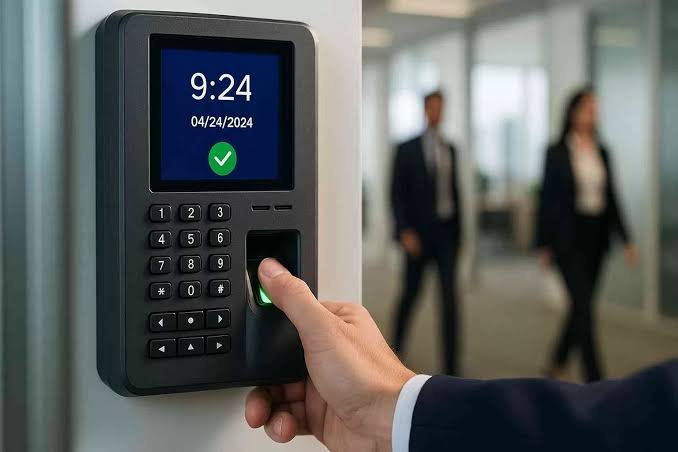
Unlike traditional attendance methods that rely on ID cards, PINs, or paper registers, biometric systems verify who you actually are — not just what you carry or what you remember. A fingerprint cannot be borrowed. A face cannot be proxied. This eliminates the single biggest problem in manual attendance tracking: proxy attendance.
The system typically consists of three components working together:
The Biometric Device — the physical unit mounted at the entry point that captures and verifies the biometric data.
The Software — a backend application (installed on a PC or cloud-based) that stores attendance records, generates reports, calculates working hours, and integrates with payroll.
The Database — stores enrolled biometric templates and attendance logs, either locally on the device or on a central server.
How Does a Biometric Attendance System Work?
The process happens in two stages — enrollment and verification.
Stage 1 — Enrollment (One-Time Setup)
Each employee or student is registered in the system. They place their finger on the sensor (or look into the camera, or scan their iris) and the device captures the biometric data. This data is converted into a mathematical template — not an actual image of your fingerprint or face — and stored in the database. This happens once per person.
Stage 2 — Daily Verification (Every In/Out)
Each time the person arrives or leaves, they present their biometric at the device. The device captures the live biometric, converts it to a template, and compares it against the stored templates in the database. If a match is found within the accepted tolerance, the system logs the timestamp automatically. The entire process takes under 2 seconds.
The attendance log is then synced — either in real time or in batches — to the software, where managers can view reports, track late arrivals, calculate total working hours, and feed the data directly into payroll processing.
Types of Biometric Attendance Systems
Not all biometric systems work the same way. Here are the main types available in India:
Fingerprint-Based Attendance System
The most common type in India. The employee presses their finger on an optical or capacitive sensor. Fast, accurate, and cost-effective. Works well for most offices, schools, and factories. Minor limitation: fingerprint quality can be affected by dry skin, cuts, or heavy manual work — which is why factory environments sometimes prefer face recognition.
Face Recognition Attendance System
The device uses a camera and AI algorithms to identify the person’s face. Completely contactless — no touching required. Became widely preferred post-COVID. Ideal for schools, hospitals, and high-traffic entry points where speed matters. Some models work in low light and can detect masked faces.
Iris Recognition Attendance System
Uses infrared cameras to scan the unique pattern of the iris. Extremely accurate — more so than fingerprint. Used in high-security environments like server rooms, defence installations, and research facilities. Higher cost than fingerprint or face recognition.
Palm Vein Recognition
Scans the vein pattern inside the palm using infrared light. Highly accurate and completely contactless. Popular in hospitals and food processing units where hygiene is critical. Less common in India but growing.
Card + Biometric (Multi-Factor)
Combines an RFID card swipe with a fingerprint or face scan for two-factor verification. Used in high-security zones where one layer of authentication is not sufficient.
Biometric Attendance System vs Traditional Methods
| Method | Proxy Attendance | Accuracy | Cost | Effort |
|---|---|---|---|---|
| Paper Register | Possible | Low | Very Low | High (manual) |
| Punch Card | Possible | Medium | Low | Medium |
| RFID Card Only | Possible | Medium | Medium | Low |
| PIN / Password | Possible | Medium | Low | Low |
| Biometric System | Not Possible | Very High | Medium | Zero (automatic) |
The fundamental advantage of biometric over every other method is that it eliminates proxy attendance completely. In Indian workplaces — especially factories, schools, and government offices — proxy attendance has historically caused significant payroll fraud and compliance issues. A biometric system closes that gap permanently.
Key Features to Look for in a Biometric Attendance System
Capacity — Users & Logs
Every device has a maximum number of fingerprint or face templates it can store, and a maximum number of attendance logs. A 50-employee office needs a device with at least 500 user capacity and 50,000 log capacity. A 500-worker factory needs significantly more. Always buy headroom above your current strength.
Connectivity — USB, LAN, Wi-Fi, or 4G
How does the device send data to the software? Basic models use USB pen drives. Better models use LAN (wired network). Premium models support Wi-Fi or 4G for remote locations with no wired infrastructure — ideal for construction sites, warehouses, or multi-location businesses.
Standalone vs Network Mode
Standalone devices work independently without being connected to a server. Network mode allows real-time sync across multiple devices at multiple locations under one central dashboard — critical for businesses with more than one office or gate.
Software Quality
The device is only as useful as the software behind it. Good attendance software should generate shift-wise reports, late-arrival alerts, overtime calculation, leave management, and one-click payroll export. Always ask for a software demo before buying.
Power Backup
Devices should have internal battery backup or be connected to a UPS. An attendance device that goes down during a power cut creates both a security gap and a data gap.
Operating Temperature
Important in India — especially for devices installed outdoors or in non-air-conditioned factory floors. Confirm the operating temperature range matches your environment.
Anti-Spoofing / Liveness Detection
Premium face recognition devices can detect whether they are looking at a real face or a photograph. This is called liveness detection and is important in environments where the stakes of fraud are high.
Biometric Attendance System Price in India — 2026
| Category | Price Range | Best For |
|---|---|---|
| Basic Fingerprint Device | ₹3,000 – ₹8,000 | Small offices, shops, 10–50 employees |
| Mid-Range Fingerprint | ₹8,000 – ₹18,000 | Offices, schools, 50–200 employees |
| Face Recognition (Entry) | ₹12,000 – ₹25,000 | Schools, offices wanting contactless |
| Face Recognition (Premium) | ₹25,000 – ₹60,000 | Hospitals, large corporates, factories |
| Iris Recognition | ₹40,000 – ₹1,20,000 | High-security environments |
| Multi-Location Cloud System | ₹15,000 – ₹40,000 per device + software | Businesses with multiple branches |
⚠️ These prices are for the device only. Software licensing, installation, cabling, and AMC are additional costs. Always request an all-inclusive quote.
What Affects the Price:
- Biometric type — iris costs more than face, face costs more than fingerprint
- User and log capacity — higher capacity devices cost more
- Connectivity — Wi-Fi and 4G models cost more than LAN-only
- Brand — ZKTeco, ESSL, Suprema carry different price points
- Software — some brands charge per user per month; others offer a one-time licence
- Number of locations — multi-site setups need a server or cloud subscription
Top Biometric Attendance System Brands in India
ZKTeco
The most widely deployed biometric brand in India. Offers the widest product range — from basic fingerprint devices at ₹4,000 to enterprise face recognition terminals at ₹60,000+. Excellent software ecosystem. Raise Solutions is an authorised ZKTeco dealer.
ESSL Security
Indian brand, widely trusted across SMBs and mid-sized companies. Competitive pricing, good local support network, reliable hardware. Popular choice for schools and manufacturing units.
Suprema
South Korean brand, used in premium enterprise and government deployments. Among the most accurate biometric hardware available. Higher price point — typically ₹25,000 and above per device.
Honeywell
Used in large enterprise and government installations. Strong integration with broader building management systems.
Matrix Comsec
Indian brand with a strong focus on integrated attendance, access control, and payroll. Popular in mid-to-large businesses wanting an end-to-end solution from one vendor.
Who Needs a Biometric Attendance System?
Small Offices (10–50 Employees)
A single fingerprint device with basic software is sufficient. Eliminates manual register, gives accurate payroll data, and takes under a day to install and configure.
Schools and Colleges
Face recognition devices work best — no fingerprint quality issues with children, fast processing for high-footfall entry points, and optional student tracking for parent notifications. Staff attendance tracking is automated and feeds directly into payroll.
Factories and Manufacturing Units
Multi-shift environments need robust devices with high log capacity and shift-wise reporting. Face recognition preferred over fingerprint due to manual workers having worn fingerprints. Multi-gate setups need networked devices on a central dashboard.
Hospitals and Healthcare
Contactless face recognition is ideal — hygiene critical. Different departments and wings can have separate devices all feeding into one central attendance record.
Construction Sites
4G-enabled standalone devices that work without internet or wired infrastructure. Battery-backed, rugged housing for outdoor environments. Labour attendance tracking is also a compliance requirement under many government contracts.
Multi-Location Businesses
Cloud-based biometric systems allow the owner to see attendance across all locations in real time from a single dashboard — without physically visiting each site. Critical for businesses with branches across multiple cities.
Biometric Attendance System Installation — What to Expect
Step 1 — Site Assessment
The installer visits to assess the number of entry points, power availability, network connectivity, and number of employees. This determines the device model, quantity, and software plan.
Step 2 — Device Mounting
Devices are wall-mounted at the appropriate height (typically 140–150 cm from floor level for face recognition, slightly lower for fingerprint). Power and network cabling are routed neatly.
Step 3 — Software Installation & Configuration
The attendance software is installed on a PC or configured on a cloud server. Shift timings, grace periods, overtime rules, holiday calendar, and leave policies are configured.
Step 4 — Employee Enrollment
Each employee is enrolled — fingerprint, face, or iris captured and stored. For large organisations, this is done department by department. A 100-person enrollment typically takes 2–3 hours.
Step 5 — Testing & Training
The system is tested with live attendance cycles. HR and admin staff are trained on generating reports, managing exceptions, and exporting payroll data.
Step 6 — Handover
Documentation, warranty cards, and software licence details are handed over. AMC terms are discussed.
🔧 Raise Solutions completes standard biometric installations within 1 working day for setups up to 100 employees. Multi-location or large factory setups take 2–4 days depending on site complexity.
Common Problems Biometric Systems Solve
Proxy Attendance
The most universal problem across Indian workplaces. One employee marks attendance for another. Biometric makes this physically impossible.
Payroll Errors
Manual registers lead to calculation errors in overtime, late marks, and leave deductions. Biometric software calculates everything automatically and exports directly to payroll.
Buddy Punching
In card-based systems, employees swipe each other’s cards. Biometric eliminates this entirely since the body cannot be transferred.
Compliance & Audit
Many government tenders, ISO audits, and labour law compliance checks require documented attendance records. Biometric systems provide tamper-proof digital records with timestamps.
Remote Monitoring
Business owners with multiple locations cannot physically verify attendance at each site. Cloud-connected biometric systems allow real-time monitoring from anywhere.
Yes. Most standalone biometric devices store attendance logs locally in their internal memory and sync to the software when connected via USB or LAN. Cloud-based systems require internet for real-time sync but most also store data locally as a backup.
This can happen due to dry skin, cuts, or worn fingerprints. Good devices allow backup verification methods — PIN or card — for such cases. Face recognition eliminates this problem entirely.
Why Choose Raise Solutions for Your Biometric Attendance System?
- ✅ Authorised ZKTeco and ESSL dealer — genuine products, full warranty
- ✅ Free site assessment before any commitment
- ✅ End-to-end service — supply, installation, enrollment, training, and AMC
- ✅ Integration with access control, boom barriers, and interactive panels if needed
- ✅ ISO Certified | MSME Registered | NSIC Recognised
- ✅ Serving offices, schools, factories, and hospitals across Andhra Pradesh and Telangana
📞 Get a Free Consultation Today
Call: +91 8522959096
Email: info@raisesolutions.in
Website: raisesolutions.in
Visit: Nidamanuru Road, Poranki, Vijayawada, Andhra Pradesh – 521137
Tell us your employee count, number of locations, and industry — we will recommend the right system within 24 hours.
Pingback: Biometric Attendance vs Manual Attendance — Cost, Accuracy & ROI Compared