If you run a business in Vijayawada — whether it’s a corporate office, a manufacturing unit, a hospital, or a school — one question you’ve probably asked yourself is: “Who is entering my premises, and when?”
That’s exactly what an access control system answers.
In this guide, we’ll break down everything you need to know about access control systems for offices in Vijayawada — what they are, how they work, what types are available, and why your office needs one right now.
What Is an Access Control System?
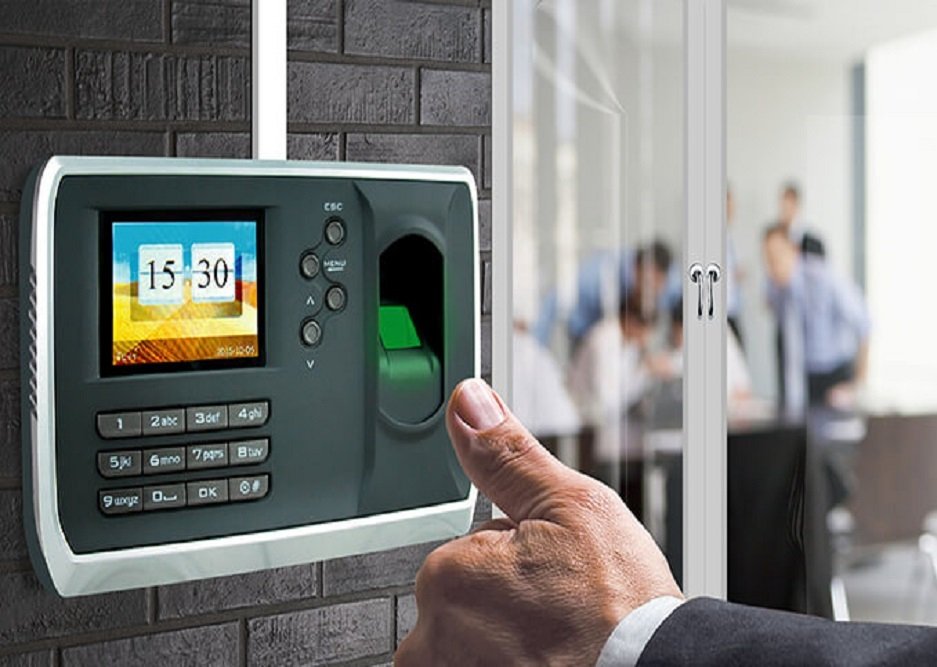
An access control system is a security solution that controls who can enter or exit specific areas of your office or building. Instead of traditional lock-and-key, modern access control uses technology — biometrics, RFID cards, face recognition, or PIN codes — to grant or restrict entry.
Think of it as a digital security guard that works 24 hours a day, 7 days a week, without breaks, errors, or bias.
Why Do Offices in Vijayawada Need Access Control Systems?
Vijayawada is one of the fastest-growing commercial hubs in Andhra Pradesh. With new IT parks, manufacturing zones, hospitals, educational institutions, and government offices expanding rapidly, physical security has become more critical than ever.
Here’s why businesses in Vijayawada are switching to access control systems:
- Rising security incidents in commercial areas
- Need to track employee attendance accurately
- Protection of sensitive data rooms, server rooms, and warehouses
- Compliance requirements for ISO-certified and government-registered businesses
- Prevention of unauthorised visitor entry
A traditional lock and key cannot handle these challenges anymore.
Types of Access Control Systems Available in Vijayawada
1. Biometric Fingerprint Access Control
This is the most widely used system in Vijayawada offices today. Employees register their fingerprints, and the system grants entry only to registered users. It eliminates buddy punching (where one employee marks attendance for another) and is extremely difficult to tamper with.
Best for: Small to mid-size offices, factories, clinics, schools.
2. Face Recognition Access Control
The most advanced and contactless option. The system captures facial features and matches them against a registered database in less than a second. It works even with masks in most modern AI-powered devices.
Best for: Hospitals, IT companies, high-security zones, offices post-COVID that prefer zero-touch solutions.
3. RFID Card-Based Access Control
Employees are issued proximity cards or key fobs. They tap the card at the reader to gain entry. It’s fast, affordable, and scalable. The downside is that cards can be lost or shared.
Best for: Large offices with high footfall, hotels, co-working spaces.
4. PIN or Password-Based Access Control
A numeric keypad where employees enter a code to enter. Simple and low-cost, but less secure since PINs can be shared.
Best for: Small offices with limited budget or low-risk areas.
5. Multi-Factor Access Control (Biometric + Card)
Combines two or more verification methods for maximum security. Entry is only granted when both checks pass — for example, a card tap followed by a fingerprint scan.
Best for: Server rooms, cash vaults, data centres, research labs.
Key Features to Look for in an Office Access Control System
When choosing an access control system for your Vijayawada office, don’t just buy the cheapest device. Look for these features:
Real-time monitoring — See who enters and exits, live, from your computer or mobile phone.
Audit trail and reports — Complete logs of every entry and exit, time-stamped and stored for weeks or months.
Integration with attendance software — The system should connect with your payroll software to automate salary calculations.
Multi-door management — One software panel should manage all doors across your office or multiple branches.
Mobile app control — Ability to lock/unlock doors remotely using a smartphone.
Anti-passback — Prevents a person from entering the same door twice without exiting first. Useful for high-security areas.
Visitor management — Some systems include a visitor module where guests can register, get a temporary access card or QR code, and their entry is tracked.
Alert and notification system — Instant SMS or email alerts when someone tries to access a restricted area or when the door is held open too long.
How Does an Access Control System Work?
The process is simple:
Step 1 — A person presents their credential (fingerprint, face, card, or PIN) at the reader installed at the door.
Step 2 — The reader sends the data to the access control panel (the brain of the system).
Step 3 — The panel checks whether that person is authorised to enter that specific door at that specific time.
Step 4 — If authorised, the panel sends a signal to the electric lock to open.
Step 5 — The event is recorded in the system log with the person’s name, time, and door.
The entire process takes less than one second.
Where Can Access Control Be Installed in Your Office?
You don’t need to install it on every door. Start with the high-priority areas:
Main entrance and reception — Control who enters the building.
Server room or data centre — Protect critical IT infrastructure.
Accounts and finance department — Restrict access to sensitive financial records.
MD or director’s cabin — Ensure privacy and security for top management.
Warehouse or stockroom — Prevent theft or inventory loss.
HR and payroll department — Protect employee data.
Access Control + Attendance Management: A Powerful Combination
One of the biggest advantages of modern access control systems is that they double as attendance management tools. Every time an employee taps their card or scans their face, the system records the exact time. This data is automatically synced with attendance and payroll software.
This means:
No manual attendance registers No proxy attendance Automatic salary calculation based on working hours Late arrival and early departure alerts to managers Leave management integration
For Vijayawada businesses that still use paper attendance sheets or Excel files, this is a game-changer.
Popular Brands Used in Vijayawada Offices
ZKTeco — The most trusted brand in India for biometric and access control. Devices like the SpeedFace V5L and ProFace X are widely installed across Vijayawada offices.
eSSL — Affordable and reliable, popular with small and mid-size businesses.
Hikvision — Known for their AI-powered face recognition terminals.
Suprema — Premium access control used in high-security environments.
Honeywell — Enterprise-grade access control for large corporates.
How Much Does an Access Control System Cost in Vijayawada?
Cost depends on the type of system, number of doors, and brand. Here’s a general estimate:
Basic fingerprint reader for one door — Rs. 5,000 to Rs. 12,000
Mid-range face recognition terminal — Rs. 15,000 to Rs. 35,000
Premium AI face recognition (ZKTeco SpeedFace, Hikvision) — Rs. 40,000 to Rs. 80,000
Complete multi-door system with software for a 50-person office — Rs. 50,000 to Rs. 1,50,000 depending on configuration
Installation, wiring, and AMC (Annual Maintenance Contract) are charged separately. Always ask for a site survey before finalizing a quote, as installation complexity varies.
Steps to Install an Access Control System in Your Vijayawada Office
Step 1: Site Survey — A technician visits your office to understand the layout, number of doors, and your security requirements.
Step 2: System Design — The right combination of readers, controllers, locks, and software is recommended.
Step 3: Hardware Procurement — Devices are sourced from authorised dealers of brands like ZKTeco or eSSL.
Step 4: Installation and Wiring — Access control readers, electromagnetic locks, and exit buttons are installed at each door.
Step 5: Software Configuration — The access control software is set up on a server or cloud. Employee profiles, access levels, and time schedules are programmed.
Step 6: Employee Enrollment — All employees register their fingerprints or face on the system.
Step 7: Testing — Every door and credential is tested to ensure proper functioning.
Step 8: Training — Your admin staff is trained to manage the system, run reports, and add or remove users.
Step 9: AMC Support — Ongoing maintenance, software updates, and technical support.
Access Control for Different Types of Offices in Vijayawada
IT and Software Companies — Need strict server room access, audit trails for compliance, and integration with HR software.
Manufacturing Units — Require factory floor access restrictions, contractor management, and shift-based scheduling.
Hospitals and Clinics — Patient ward access, pharmacy security, staff-only zones, and visitor control.
Schools and Colleges — Staff entry management, restricted access for laboratories and principal’s office.
Banks and Financial Institutions — Multi-factor authentication, vault access control, and complete audit logs.
Government Offices — Visitor management, staff attendance, and high-security zone control.
Common Mistakes Businesses Make When Buying Access Control Systems
Buying on price alone — A cheap device with poor software is more expensive in the long run.
Not planning for scalability — Your office will grow. Choose a system that can add more doors and users easily.
Ignoring software — The hardware is only as good as the software managing it. Always check the software features before buying.
Skipping the AMC — Access control systems need periodic maintenance. A device failure at 9 AM on a Monday can lock your entire office out.
Not integrating with payroll — You lose half the value of the system if attendance data isn’t connected to salary processing.
Why Choose a Local Vijayawada Supplier?
Buying from a local, authorised dealer in Vijayawada has real advantages:
Faster installation and same-day support. Knowledge of local building layouts and wiring standards On-site AMC visits instead of remote-only support Personalised system design based on your specific office needs. Better pricing on bulk or multi-branch installations
Final Thoughts
An access control system is no longer a luxury for large corporations. It is a practical, affordable, and essential investment for any office in Vijayawada that values security, efficiency, and accountability.
Whether you’re a 10-person startup in Poranki or a 500-employee manufacturing firm in Auto Nagar, there is a solution designed for your budget and your needs.
The right system will save you money on security staff, eliminate attendance fraud, protect your valuable assets, and give you complete visibility over your office operations — all from your phone or computer.
If you’re looking for expert guidance on selecting and installing the right access control system for your office in Vijayawada, reach out to a certified local provider who can do a free site survey and recommend the best solution for your space.
About Raise Solutions
Raise Solutions is an authorised dealer of ZKTeco and eSSL access control systems in Vijayawada, Andhra Pradesh. With expertise in biometric attendance, face recognition, boom barriers, and complete security solutions, we help businesses across Andhra Pradesh secure their premises and streamline their operations.
Call us: +91 85229 59096 Email: info@raisesolutions.in Visit: raisesolutions.in