
By Raise Solutions | Vijayawada, Andhra Pradesh | April 2026 | 10 min read
Introduction
Think about the last time you sat through a presentation delivered on a dusty projector with a blurry image and a presenter fumbling for the laser pointer. Or a classroom where a teacher wrote endlessly on a chalk board while students struggled to copy notes fast enough.
Now imagine the same space — but with a large, vivid, touch-sensitive screen on the wall. The teacher writes directly on the screen with their finger. A student in the back row zooms in on a diagram with a pinch gesture. A corporate trainer in Vijayawada is collaborating live with a team in Hyderabad. Videos, maps, simulations, and live annotations — all on one screen, in real time.
That screen is an Interactive Flat Panel — and it is rapidly replacing projectors, whiteboards, and traditional displays across classrooms, boardrooms, and training centres all over India.
In this guide, Raise Solutions — Vijayawada’s trusted AV and Smart Classroom solutions provider — explains everything you need to know about interactive flat panels: what they are, how they work, what makes them special, and why your institution or business needs one today.
What Is an Interactive Flat Panel?
An Interactive Flat Panel (IFP) — also called an Interactive Display Panel or Smart Board — is a large-format, touch-enabled LED or LCD screen that combines the functions of a television, a computer, a whiteboard, and a projector into one powerful, all-in-one device.
Unlike a regular TV or monitor that only displays content, an interactive flat panel responds to touch. You can write on it, draw on it, drag and drop content, zoom in, annotate over videos, and even control it with gestures — just like using a giant smartphone or tablet.
Interactive flat panels are available in sizes ranging from 55 inches to 110 inches and beyond, and are designed for wall mounting in classrooms, conference rooms, training halls, and auditoriums.
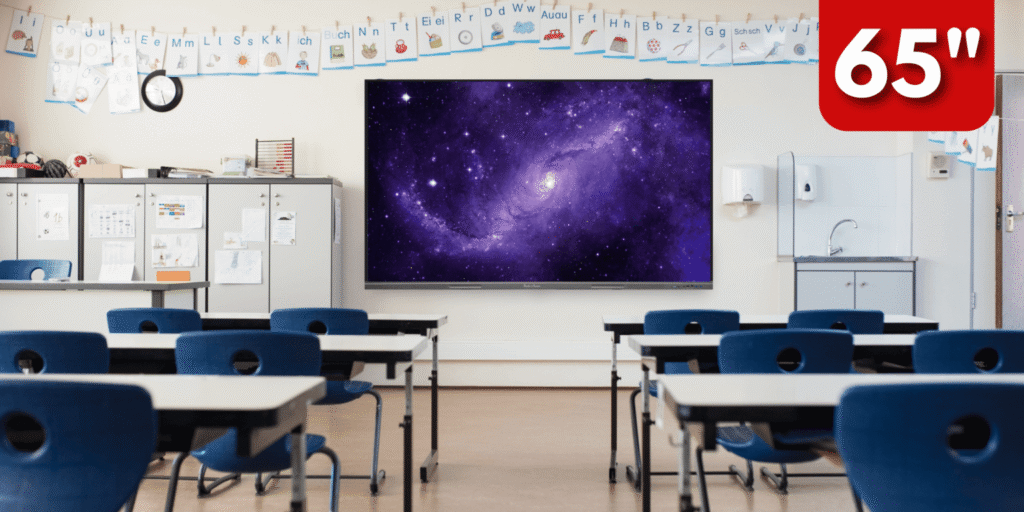
In simple terms: if a whiteboard and a smart computer had a child, it would be an interactive flat panel.
Interactive Flat Panel vs Traditional Projector: What Is the Difference?
Before going deeper, it helps to understand why interactive flat panels are replacing traditional projectors so rapidly — especially in Indian schools and businesses.
Image quality: A projector’s image depends on ambient light, distance, and the quality of the projection surface. An interactive flat panel delivers sharp, vivid 4K resolution regardless of room lighting — making it clearly superior for daytime use.
Touch and interactivity: Projectors cannot be touched. They are passive display devices. Interactive flat panels support multi-touch, stylus input, and gesture control — making them active, collaborative tools.
Maintenance: Projectors have bulbs that burn out every 2,000–5,000 hours and cost thousands of rupees to replace. Interactive flat panels use LED backlighting with a lifespan of 30,000–50,000 hours and require virtually no consumable maintenance.
Setup and portability: Projectors require calibration, darkened rooms, and careful alignment. Interactive flat panels are plug-and-play — power on and start working.
Hygiene and durability: Chalk dust from blackboards is a health hazard. Projector screens get damaged easily. Interactive flat panels have toughened glass surfaces that are easy to clean and built to last years of daily use.
The verdict is clear — for any modern classroom or boardroom, the interactive flat panel is the superior choice in every measurable way
Key Components of an Interactive Flat Panel
An interactive flat panel is not just a screen. It is an integrated system of several technologies working together:
1. High-Resolution LED Display
The core of the panel is a high-definition LED display — most modern IFPs offer 4K Ultra HD resolution (3840 x 2160 pixels). This ensures crisp, clear visuals whether you are displaying text, images, videos, or data — even from the back of a large classroom or conference room.
2. Infrared (IR) or Capacitive Touch Technology
The touch layer on the screen detects input from fingers, styluses, or even regular pens. Infrared touch technology uses a grid of IR sensors around the screen border. Capacitive touch (found in premium panels) offers even higher accuracy and supports palm rejection — preventing accidental touches when your hand rests on the screen while writing.
Most modern interactive flat panels support 10 to 20 simultaneous touch points, allowing multiple students or participants to interact with the screen at the same time.
3. Built-In Android Operating System
Premium interactive flat panels come with a built-in Android operating system (typically Android 11 or 13), which means they function as standalone smart devices even without a connected computer. You can browse the internet, open apps, run educational software, stream videos, and use productivity tools directly from the panel.
4. Built-In Computer (OPS Slot)
Many IFPs include an OPS (Open Pluggable Specification) slot — a built-in PC module that runs Windows. This eliminates the need for a separate laptop or desktop, making the panel a truly self-contained workstation.
5. High-Quality Audio System
Built-in stereo speakers deliver clear audio for video playback, virtual classes, and conference calls. Premium panels include noise-cancelling microphones for hands-free voice interaction and video conferencing.
6. Multiple Connectivity Ports
Interactive flat panels are connectivity hubs. They typically include HDMI inputs, USB-A and USB-C ports, a 3.5mm audio jack, an SD card slot, an RJ45 LAN port, and Wi-Fi and Bluetooth connectivity. This allows laptops, tablets, smartphones, document cameras, and other devices to connect seamlessly.
7. Whiteboard and Annotation Software
Every interactive flat panel comes with built-in whiteboard software that allows users to write, draw, highlight, insert images, and annotate over any content displayed on the screen. Notes can be saved, shared, or exported as PDFs — eliminating the need to photograph a whiteboard.
8. Screen Sharing and Wireless Casting
Most IFPs support wireless screen sharing from laptops, tablets, and smartphones via Miracast, AirPlay, or dedicated apps. In a classroom, students can share their work from their own devices directly to the main panel without any cables.
How Does an Interactive Flat Panel Work?
Here is a simple step-by-step explanation of how an interactive flat panel functions in a real-world setting:
Step 1: Power on The panel powers up in seconds — no warming up, no alignment, no bulb checks. The home screen displays available apps, connected devices, and recent files.
Step 2: Connect your device or use the built-in system A teacher or presenter can connect their laptop via HDMI or USB-C, cast wirelessly from a tablet or phone, or simply use the panel’s own built-in Android or Windows system to open content directly.
Step 3: Interact with the content The presenter can touch the screen to navigate, write annotations over a PDF, draw diagrams on the whiteboard, play a video and pause it mid-frame to annotate, or drag and zoom into a map or diagram — all with their fingers or a stylus.
Step 4: Collaborate in real time In a classroom, multiple students can approach the panel simultaneously and work on different parts of the screen. In a boardroom, remote participants can join via video conference software and see all annotations in real time.
Step 5: Save and share At the end of the session, all whiteboard notes, annotations, and files can be saved to a USB drive, sent via email, uploaded to cloud storage, or shared directly to students’ devices — ensuring no learning or discussion point is ever lost.
Types of Interactive Flat Panels
Not all interactive flat panels are the same. Here are the main types available:
Education-grade IFP: Designed for classrooms with anti-glare glass, child-safe rounded edges, and education-specific software pre-installed. Supports multi-user simultaneous touch for group learning activities.
Corporate/Enterprise IFP: Optimised for conference rooms with built-in video conferencing, wireless presentation, and integration with Microsoft Teams, Zoom, and Google Meet.
Dual-OS IFP: Runs both Android and Windows simultaneously, giving users the flexibility of both operating systems on the same screen without switching devices.
4K Ultra HD IFP: Premium panels with 4K resolution for large auditoriums, training halls, and command centres where image clarity at a distance is critical.
Portable IFP (with stand): Mounted on a mobile stand with wheels, allowing the panel to be moved between classrooms, meeting rooms, or training halls as needed.
Key Features to Look for in an Interactive Flat Panel
When choosing an interactive flat panel for your school, college, or business, evaluate these features carefully:
Screen size: Choose based on room size and viewing distance. 65–75 inch panels suit most classrooms. 86 inch and above are ideal for large conference rooms or auditoriums.
Resolution: Always opt for 4K Ultra HD (3840 x 2160). Full HD panels are adequate for small rooms but 4K delivers significantly superior clarity for detailed content.
Touch points: A minimum of 10-point multi-touch is recommended. 20-point touch enables richer collaboration with multiple simultaneous users.
Operating system: Android 11 or 13 is the current standard. Ensure the panel supports regular OS updates for long-term usability.
Brightness: Measured in nits. A minimum of 350–400 nits is recommended for well-lit rooms. Higher brightness ensures visibility even in rooms with large windows.
Built-in storage and RAM: For smooth performance on the built-in OS, look for at least 4GB RAM and 32GB internal storage. Premium panels offer 8GB RAM and 128GB storage.
Connectivity: Confirm it has HDMI, USB, USB-C, LAN, Wi-Fi, Bluetooth, and an audio output as a minimum.
Anti-glare glass: Essential for reducing eye strain during long teaching or presentation sessions.
Warranty and AMC: Choose brands that offer a minimum 3-year hardware warranty and local service support.
Benefits of an Interactive Flat Panel
For Schools and Colleges
Improved student engagement: Touch-based, visual, and interactive learning captures and holds student attention far more effectively than traditional instruction methods. Studies consistently show that interactive technology improves comprehension and retention.
Multi-sensory learning: Students learn by seeing, hearing, and doing — all at once. An IFP combines video, audio, touch interaction, and collaborative activities in a single session.
Inclusive education: Interactive flat panels support learning for students with different abilities. Large text, audio narration, and visual aids make content accessible to all learners.
Paperless classroom: Teachers can plan lessons digitally, display content directly, and share notes to students’ devices — reducing paper consumption and printing costs significantly.
Real-time assessment: Teachers can run live quizzes, polls, and collaborative exercises directly on the panel and assess student understanding instantly.
Remote and hybrid learning: With built-in or integrated video conferencing, IFPs bridge the gap between in-person and remote students seamlessly.
For Corporate Offices and Boardrooms
More productive meetings: Presenters can annotate live over data, drag and rearrange content, and collaborate with remote teams — making meetings more dynamic and outcomes more actionable.
Seamless remote collaboration: Integration with Zoom, Microsoft Teams, and Google Meet means geographically distributed teams can collaborate as if they are in the same room.
Wireless presentations: Anyone in the room can share their screen wirelessly to the panel in seconds — eliminating the chaos of cables and adapters.
Professional client presentations: High-resolution 4K displays make client pitches, product demonstrations, and data presentations dramatically more impactful.
Digital brainstorming: Teams can ideate, map processes, and plan strategies on the whiteboard and save the entire session for future reference.
For Training Centres and Coaching Institutes
Scalable content delivery: Training content can be pre-loaded on the panel and reused across batches — saving preparation time and ensuring consistency.
Multimedia-rich training: Trainers can combine videos, simulations, live demonstrations, and interactive exercises in a single session.
Attendance and progress tracking: When integrated with learning management systems, IFPs support digital attendance and performance tracking.
Where Are Interactive Flat Panels Used?
Interactive flat panels are being rapidly adopted across a wide range of sectors in India:
Schools and CBSE/State Board institutions use IFPs to deliver curriculum-aligned digital lessons, run smart classrooms, and improve student outcomes.
Colleges and universities use IFPs in lecture halls, seminar rooms, and labs for interactive instruction and collaborative research.
Corporate conference rooms use IFPs for presentations, video conferencing, and strategic planning sessions.
Training and coaching centres use IFPs to deliver engaging, multimedia-rich instruction to large batches of students.
Government offices and courts use IFPs for data presentation, virtual hearings, and departmental training.
Hospitals and healthcare facilities use IFPs for medical training, patient education, and interdepartmental communication.
Retail and banking showrooms use IFPs as interactive digital signage and customer engagement tools.
Command and control centres use large-format IFPs for real-time monitoring, situational awareness, and data visualisation.
Interactive Flat Panel vs Smart Board: Are They the Same?
This is one of the most common questions. Technically, “Smart Board” is a brand name — originally trademarked by SMART Technologies. Over time, it became a generic term for any interactive whiteboard or display.
An interactive flat panel is the modern evolution of the Smart Board. Traditional Smart Boards required a projector to display an image on a whiteboard surface. Interactive flat panels are self-contained — the display, touch layer, and computing are all integrated into a single sleek panel with no projector required.
Today, most institutions refer to any touch-enabled display used for teaching or presenting as a Smart Board, but what they are actually installing is an interactive flat panel — which is superior in image quality, durability, ease of use, and long-term cost.
Interactive Flat Panel in Smart Classrooms: The Raise Solutions Approach
At Raise Solutions, we design and deploy complete smart classroom ecosystems — not just a panel on a wall. Our smart classroom solutions integrate:
Interactive Flat Panel — the centrepiece of the classroom, delivering vivid 4K touch-enabled instruction.
Biometric Attendance System — students mark attendance automatically via face recognition or fingerprint, saving class time and eliminating manual registers.
Document Camera — allows teachers to display physical textbooks, specimens, or handwritten work on the IFP in real time.
Audio System — ceiling or wall-mounted speakers ensure every student hears clearly, even in large classrooms.
Wi-Fi and Network Infrastructure — ensures seamless connectivity for online content, cloud storage, and video conferencing.
Centralised Content Management — allows school administrators to push lesson content, announcements, and schedules to all classroom panels from a single dashboard.
This is not just a technology upgrade — it is a complete transformation of the learning environment.
How Much Does an Interactive Flat Panel Cost in India?
The cost of an interactive flat panel in India depends on the screen size, brand, features, and whether installation and AMC are included.
As a general guide: entry-level 65-inch panels from standard brands start around ₹80,000 to ₹1,20,000. Mid-range 75-inch panels with 4K resolution and Android OS range from ₹1,20,000 to ₹2,00,000. Premium 86-inch and above panels with dual OS, 4K, and built-in conferencing features can range from ₹2,00,000 to ₹4,00,000 and beyond.
For schools deploying multiple panels across several classrooms, volume pricing and government scheme benefits can significantly reduce the per-unit cost.
At Raise Solutions, we offer a free site consultation and custom quotation based on your specific requirements — ensuring you get the right panel at the right price with full installation and after-sales support.
Yes. Most modern IFPs come with a built-in Android operating system that allows you to browse the internet, open apps, play videos, and use the whiteboard without connecting any external device.
Absolutely. A 65-inch or 75-inch panel is perfectly suited for a standard classroom of 30–40 students. For larger halls, 86-inch or 98-inch panels are recommended.
Why Choose Raise Solutions for Interactive Flat Panel Installation?
Raise Solutions is Vijayawada’s trusted partner for Smart Classroom and AV Solutions. We don’t just supply a panel and leave — we design, install, integrate, and support a complete smart learning or presentation environment tailored to your institution or business.
Here is what you get when you choose Raise Solutions:
- Free site assessment before any recommendation or quotation
- Expert guidance on the right panel size, features, and brand for your specific space
- End-to-end installation — wall mounting, wiring, connectivity, and software setup
- Staff training — ensuring teachers and presenters are confident using every feature
- Integration with biometrics, CCTV, and networking for a complete smart campus
- Annual Maintenance Contracts (AMC) — so your investment is protected long term
- Local support across Andhra Pradesh — Vijayawada, Guntur, Visakhapatnam, and beyond
- ISO-certified and MSME-registered — a company built on trust and accountability
An interactive flat panel is not merely a screen. It is a transformational tool that changes how knowledge is delivered, how teams collaborate, and how ideas are communicated. Whether you are a school principal looking to modernise your classrooms, a corporate manager building a world-class conference room, or a training institute aiming to deliver a premium learning experience — an interactive flat panel is the single most impactful technology investment you can make today.
The blackboard had its era. The projector had its decade. The interactive flat panel is the present — and the future.
Raise Solutions is ready to bring that future to your campus or boardroom. Our team will assess your space, recommend the right solution, handle the complete installation, and support you every step of the way.
Ready to transform your classroom or conference room? Call us at +91 85229 59096 or visit raisesolutions.in to book your free site consultation today.
Raise Solutions — Your trusted partner for Smart Classrooms, AV Solutions, Security, and Business Automation in Vijayawada, Andhra Pradesh.
Pingback: Interactive Flat Panel vs Projector for Schools in India (2026) — Guide
Pingback: Interactive Display for Schools in India 2026 — Complete Guide
Pingback: Interactive Screen vs Interactive Panel — What's the Difference?