
Walk into a school that has installed an interactive display for the first time and watch what happens in the first five minutes of class.
The teacher does not reach for chalk. The students do not copy from a blackboard. Instead, a 75-inch screen lights up at the front of the classroom. A map of ancient India zooms in with a finger tap. A student walks up and annotates a diagram directly on the screen. A video plays, pauses, and the teacher draws on top of it in real time. The entire class is leaning forward.
This is not a description of a school in Singapore or the United States. This is happening right now in schools across Andhra Pradesh, Telangana, Tamil Nadu, Maharashtra, and every other state in India — and the gap between schools that have made this shift and those that have not is becoming more visible every single academic year.
If you are a school principal, a school correspondent, a trustee, or a member of a school management committee trying to understand whether an interactive display is worth the investment — this guide is written specifically for you.
We will cover everything from what these systems actually do in a classroom, to how they work, what they cost, which brands are reliable, what to check before buying, how the installation works, and what kind of results schools across India are actually seeing.
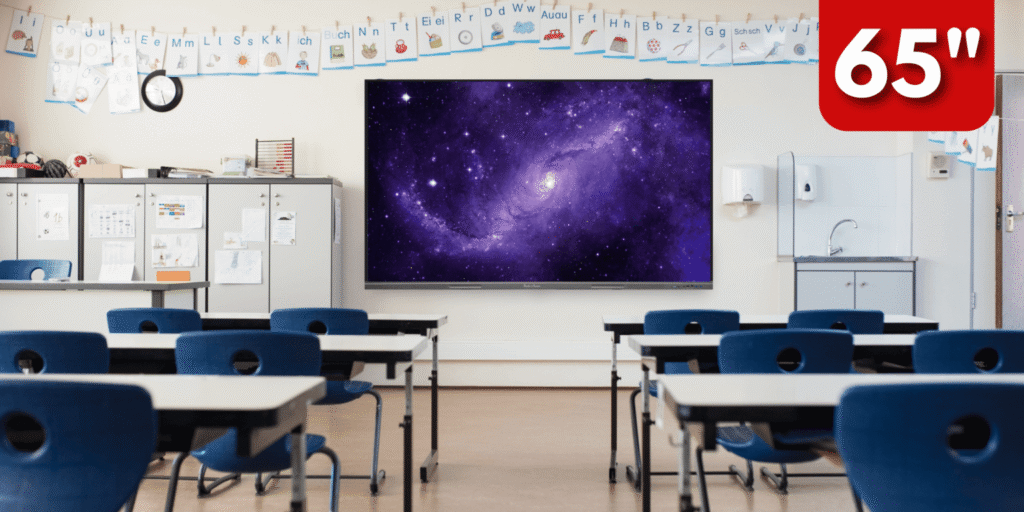
What Is an Interactive Display for Schools?
An interactive display for schools — also called an Interactive Flat Panel, a Smart Board, or an Interactive Touch Screen — is a large, wall-mounted digital screen that combines the functions of a television, a computer, a whiteboard, and a teaching tool into one device.
The screen is touch-sensitive, meaning teachers and students can write on it with their fingers or a stylus, draw diagrams, annotate images, drag and drop content, play videos, open websites, run educational apps, and collaborate in real time — all without a separate computer, keyboard, or projector.
Think of it as the next generation of the classroom blackboard. Everything a teacher once did with chalk on a slate, or with a marker on a whiteboard, or with a PowerPoint on a projector — they can now do on an interactive display, faster, more vividly, and with far greater student engagement.
The key difference between an interactive display and a regular television or monitor is the touch and annotation layer. A regular screen plays content passively. An interactive display lets the teacher and students actively engage with, modify, and annotate that content in real time.
Why Indian Schools Are Making the Switch in 2026
India’s school education landscape is undergoing the most significant transformation in decades. Several forces are converging to make interactive displays not just desirable but essential for schools that want to remain competitive and relevant.
The National Education Policy 2020 explicitly calls for technology integration in classrooms at all levels — from primary to senior secondary. Schools that demonstrate technology adoption are better positioned for accreditation, affiliation approvals, and government scheme benefits.
Parents in 2026 are more informed and more demanding than any previous generation. When choosing between two schools of comparable academic reputation, the school with modern classroom infrastructure consistently wins the admission enquiry. An interactive display on the classroom wall is visible, tangible proof of a school’s commitment to quality education.
The COVID-19 period fundamentally changed how students learn. Millions of Indian students spent two years watching video content, using interactive apps, and consuming digital educational material. When these students returned to classrooms with chalk and blackboards, the contrast was jarring. Interactive displays bridge this gap — they deliver the engagement of digital learning within the structure of the physical classroom.
Teachers are also changing. A new generation of educators in India has grown up using smartphones, tablets, and digital tools. For these teachers, an interactive display is not an unfamiliar technology to be afraid of — it is a natural extension of how they already think and communicate.
Finally, the price of interactive displays has fallen significantly. In 2019, a quality 75-inch interactive display cost Rs. 2,50,000 to Rs. 3,50,000. In 2026, equivalent or better hardware is available in the Rs. 90,000 to Rs. 1,80,000 range — making the investment achievable for a much wider range of schools, including budget-conscious private schools and government-aided institutions.
How an Interactive Display Works in a School Classroom
Understanding how the technology actually functions helps you make a more informed purchase decision and also helps you explain the value to your school management committee or board of trustees.
An interactive display for schools consists of four integrated components working together.
The Display Panel itself is a large LED or LCD screen — typically 65, 75, or 86 inches for a standard classroom — with a high-resolution display of 4K Ultra HD quality. The panel is anti-glare coated so it is clearly visible even in a classroom with natural light coming through windows — a very important factor for Indian classrooms that often have large open windows.
The Touch Layer is a grid of infrared sensors or capacitive touch sensors embedded in the screen frame. This layer detects the position of a finger or stylus anywhere on the screen with high precision. Premium interactive displays support 20 simultaneous touch points — meaning multiple students can interact with the screen at the same time, which enables group activities and collaborative exercises.
The Built-In Computer is an Android or Windows-based processor built directly into the display unit. This means the interactive panel is a self-contained computing device — it does not require a separate laptop or desktop to operate. Teachers can open apps, browse the internet, play videos, and run educational software directly from the panel.
The Operating System and Software layer is where the real classroom magic happens. Most quality interactive displays come preloaded with a suite of educational tools — a digital whiteboard for freehand writing and drawing, annotation tools that overlay on any content, a screen split function for showing multiple resources simultaneously, a built-in browser, access to educational app stores, and cloud storage integration for saving and retrieving lesson content.
Key Features to Look for in a School Interactive Display
Not every interactive display sold in India is suitable for school use. The school environment is demanding — high daily usage, multiple different teachers, students of varying heights and reach, chalk dust and classroom humidity in some settings, and budget constraints that require long-term durability.
Here are the specific features that matter most for school use:
Screen Size — The right screen size depends on your classroom depth. For a standard Indian classroom with 30 to 40 students and a room depth of 8 to 10 metres, a 75-inch or 86-inch panel is the recommended minimum. A 65-inch panel is suitable for smaller tutorial rooms or computer labs. A screen that is too small means students in the back rows cannot see fine details clearly, which defeats the purpose of the technology.
Resolution — Always specify 4K Ultra HD resolution (3840 x 2160 pixels) for school use. Full HD (1920 x 1080) looks acceptable for video but becomes blurry when teachers write text or display detailed diagrams at classroom distance. 4K ensures every student in the room can read clearly from every seat.
Touch Points — A minimum of 10 simultaneous touch points is recommended for classroom use. This allows multiple students to interact with the screen at the same time during group activities. Premium models offer 20 touch points.
Anti-Glare Coating — This is non-negotiable for Indian classrooms. Most school classrooms have windows that let in direct sunlight for large parts of the day. A panel without anti-glare coating becomes effectively invisible in these conditions. Always confirm anti-glare specification before purchasing.
Built-In Android or Windows OS — A panel with a built-in operating system does not require a separate laptop. This simplifies operation for teachers, reduces the number of devices to manage and maintain, and eliminates the cable clutter of connecting external computers. Look for Android 11 or higher, or Windows 11, for best software compatibility.
Speaker Quality — Built-in speakers are standard on all interactive displays, but the quality varies enormously. For a classroom of 40 students, the built-in speakers should deliver a minimum of 2 x 20 watts of clear audio without distortion at the volume levels needed for the back of the room. Underpowered speakers in a large classroom mean students cannot hear educational videos clearly.
Processor Speed — The built-in processor determines how smoothly the panel runs apps, switches between activities, and responds to touch. For school use, look for at least an octa-core processor with 4GB RAM and 32GB internal storage minimum. A slow processor means laggy response time, which frustrates both teachers and students and reduces the willingness to use the technology.
Eye Care Certification — Students spend extended periods looking at these screens every day. Look for panels with TUV Rheinland Eye Care certification or equivalent, which confirms that the display meets standards for low blue light emission and flicker reduction. This matters for student eye health over years of daily classroom use.
Durability and Build Quality — School environments are tough. Students brush past the screen, touch it with dirty hands, and occasionally knock into it. The panel frame should be metal or high-grade ABS plastic, not cheap hollow plastic. The glass should be tempered and rated for impact resistance. Ask the supplier for the panel’s ingress protection rating and the frame material specification.
Warranty — A minimum 3-year on-site warranty is the standard for school purchases. Never accept a carry-in warranty for a wall-mounted classroom installation. On-site means the service engineer comes to your school — you do not remove the panel and carry it anywhere. Confirm this explicitly before signing the purchase order.
Interactive Display Screen Sizes and Which Classrooms They Suit
65 inch — Small tutorial rooms, computer labs, staff meeting rooms, rooms with up to 20 students and a depth of up to 6 metres
75 inch — Standard classrooms with 25 to 40 students and a room depth of 7 to 9 metres. This is the most popular size for Indian schools in 2026.
86 inch — Large classrooms with 40 to 60 students, lecture halls, and seminar rooms with a depth of 9 to 12 metres
98 inch and above — Auditoriums, large conference halls, and multi-purpose halls. Typically requires additional audio equipment for adequate sound coverage.
Interactive Display Price in India for Schools (2026)
This is the question every school management committee asks first. Here is a realistic price breakdown for 2026 — covering hardware, installation, and the true total cost of ownership.
65 inch interactive display — Rs. 55,000 to Rs. 1,10,000 depending on brand and specification
75 inch interactive display — Rs. 90,000 to Rs. 1,80,000 depending on brand and specification
86 inch interactive display — Rs. 1,50,000 to Rs. 2,80,000 depending on brand and specification
98 inch interactive display — Rs. 3,00,000 to Rs. 5,50,000 depending on brand and specification
These are hardware prices. Add the following for total installed cost:
Wall mounting bracket and installation — Rs. 2,000 to Rs. 5,000 per unit depending on wall type
Electrical point installation — Rs. 1,000 to Rs. 3,000 per classroom if a dedicated point is needed
OPS module (optional Windows PC slot) — Rs. 15,000 to Rs. 35,000 if Windows is required in addition to Android
Teacher training — included by reputable suppliers, charged separately by others
For a school planning a 10-classroom rollout with 75-inch panels, the total all-inclusive installed cost in 2026 typically ranges from Rs. 11,00,000 to Rs. 18,00,000 depending on the brand chosen and the level of specification.
For a single-classroom pilot installation with a quality 75-inch panel, budget Rs. 1,10,000 to Rs. 1,70,000 all-inclusive.
Top Interactive Display Brands Available for Schools in India (2026)
The interactive display market in India has several strong brands. Here is an honest assessment of the options available to schools.
Maxhub is one of the most widely adopted interactive display brands in Indian schools and corporate environments. Known for strong build quality, smooth Android performance, and a comprehensive suite of built-in educational tools. Available in 65, 75, 86, and 98-inch sizes. Pricing is in the mid-to-premium range.
BenQ is a Taiwanese brand with a strong education-focused product line. BenQ’s interactive displays are known for their eye care certification, anti-glare glass quality, and reliable touch performance. BenQ has been particularly popular with CBSE and ICSE schools across South India.
Promethean is a UK-based brand with a long history specifically in classroom technology. Their ActivPanel series is designed entirely around school use cases with dedicated educational software. Pricing is at the premium end but the software ecosystem is among the best available.
ViewSonic offers a strong mid-range option for schools with budget constraints. Good display quality, reliable touch performance, and a solid warranty programme. Popular with budget-conscious private schools and government-aided institutions across Andhra Pradesh.
Newline and Hikvision are newer entrants to the Indian school market offering competitive pricing with improving build quality. Suitable for schools where budget is the primary constraint.
Local and unbranded panels are available from Rs. 40,000 to Rs. 70,000 for 75-inch units, but these should be avoided for school installations. They typically offer no meaningful warranty, no local service network, poor touch accuracy, weak processors, and inadequate build quality for the demands of daily classroom use. The apparent saving of Rs. 30,000 to Rs. 50,000 per unit becomes a false economy within 12 to 18 months when the hardware begins to fail with no support.
Raise Solutions supplies and installs interactive displays from leading brands in Vijayawada, Guntur, and across Andhra Pradesh. We help school management committees evaluate specifications and select the right brand and size for their specific classroom dimensions, usage requirements, and budget.
How an Interactive Display Transforms Each Subject
One of the most powerful arguments for an interactive display is not just that it makes teaching easier — it makes specific subjects dramatically more effective.
Mathematics — Teachers can draw geometric figures on the screen with precision, annotate equations step by step, and use built-in graphing tools to show curves, functions, and transformations in real time. Students can come to the screen and demonstrate their working, which gives the teacher instant visibility into understanding gaps.
Science — Diagrams of the human body, molecular structures, circuit diagrams, and ecosystem maps can be displayed in full 4K clarity and zoomed into at any level of detail. Educational apps for science bring otherwise abstract concepts — plate tectonics, cellular respiration, electromagnetic fields — to life with animations and simulations that are simply not possible on a blackboard.
Geography — Interactive world maps can be zoomed, rotated, annotated, and overlaid with data layers. Students exploring physical geography, political boundaries, or climate patterns on a large interactive screen retain information far more effectively than students reading from a printed atlas.
History — Primary source documents, historical photographs, maps of ancient empires, and timelines can all be displayed and annotated live. A teacher explaining the Mughal administrative system or the causes of World War One can pull up historical images, mark routes on maps, and build visual timelines on screen as the explanation unfolds.
Language and Literature — Teachers can display passages of text and annotate them with vocabulary notes, grammatical analysis, and contextual connections in real time. Poetry can be paired with images. Creative writing exercises can be brainstormed on the whiteboard function with the whole class contributing simultaneously.
Computer Science — Code can be displayed, annotated, and debugged on screen with the class watching. Algorithms can be visualised as flowcharts drawn in real time. Students can come to the screen to demonstrate their code logic.
Physical Education and Health — Diagrams of sports techniques, human anatomy for health lessons, and training videos can all be displayed and paused at key frames for discussion.
How Teachers Use Interactive Displays — Day to Day
Understanding the practical daily workflow helps school management set realistic expectations and plan training programmes effectively.
In a typical class period, a teacher using an interactive display opens the session by pulling up the day’s lesson content — which may be a preloaded presentation, a textbook page photographed and stored in the panel, or a YouTube educational video. They annotate over this content with the built-in pen tool as the class progresses, circling key points, underlining important terms, and drawing diagrams that reinforce the explanation.
At intervals, the teacher uses the screen splitting function to display two pieces of content simultaneously — for example, a diagram and a related text passage, or a question and a worked example. Students come to the front to write answers directly on the screen, or they participate in interactive quiz activities built into the panel’s educational apps.
At the end of the period, the teacher saves everything annotated during the class — every diagram drawn, every note made, every student contribution — as a PDF or image file and sends it to students via the school’s learning management system or WhatsApp group. Students now have a perfect digital record of the lesson to refer to for revision.
This workflow, once established, is faster and more effective than any combination of blackboard, projector, and textbook — and it leaves every student with a complete visual record of every lesson without copying a single word.
What to Expect During Installation — A School’s Guide
A professional interactive display installation for a school classroom takes one working day per classroom, assuming the electrical point is already available.
The installation process covers wall mounting bracket fitting, panel mounting and levelling, electrical connection, cable management and concealment, Android setup and school app configuration, connectivity testing — WiFi, Bluetooth, and screen mirroring — and a full operational test of touch, display, audio, and software.
After installation, teacher training is the most important next step. A one-time 2 to 3 hour training session per classroom or per department group covers the daily operational workflow, whiteboard and annotation tools, content management, screen mirroring from teacher laptop or phone, app installation and management, and basic troubleshooting.
At Raise Solutions, we include teacher training as part of every installation package. We have found that schools where teachers receive proper initial training adopt the technology fully within 2 to 3 weeks. Schools where training is skipped often see the panel used as an expensive television for the first several months, which does not deliver the pedagogical impact the investment deserves.
Government Schemes and Funding for School Interactive Displays in Andhra Pradesh
Schools in Andhra Pradesh and across India should be aware of several government initiatives that either directly supply or financially support the adoption of interactive classroom technology.
The Samagra Shiksha Abhiyan scheme under the Ministry of Education includes provisions for ICT infrastructure in government and government-aided schools, including interactive display panels in some categories of schools.
The Andhra Pradesh government’s Mana Badi Nadu Nedu programme has invested significantly in physical infrastructure for government schools across the state, with digital classroom components included in some phases.
CBSE affiliated schools can avail of scheme benefits under the ICT integration guidelines issued by the Central Board that encourage smart classroom adoption as part of school quality benchmarking.
Private unaided schools typically fund interactive display purchases from their own capital budget, fee income, or through school development fund contributions. At the per-classroom investment level of Rs. 1,10,000 to Rs. 1,80,000, many private schools find that the technology pays for itself within two to three admission cycles through improved parent preference and increased enrolment.
Contact Raise Solutions for guidance on scheme eligibility and documentation support for schools in Andhra Pradesh considering government-scheme-funded interactive display procurement.
Common Mistakes Schools Make When Buying Interactive Displays
After supplying and installing interactive displays across schools in Vijayawada, Guntur, and the wider Andhra Pradesh region, we have seen the same mistakes made repeatedly. Here is how to avoid them.
Choosing screen size based on price rather than classroom dimensions. A 65-inch panel may look like a significant saving over a 75-inch unit, but if your classroom is 9 metres deep with 40 students, the smaller screen will not be readable from the back rows. Always size the screen to the room, not to the budget.
Buying without a site visit from the supplier. Every classroom wall is different — some have structural beams that affect mounting, some have window positions that create glare problems, some have electrical supply limitations. A supplier who quotes without visiting your school does not know what they are installing into.
Prioritising price over warranty and service. The cheapest interactive display from an unknown brand with no local service network is a significant risk for a school. When the panel develops a touch issue or a display fault six months after installation and the supplier is unreachable, your investment is stranded. Always prioritise warranty terms and local service capability over hardware price.
Skipping teacher training. The interactive display is only as effective as the teachers using it. A school that installs without training will see the panels used for basic video playback only — missing 80 percent of the technology’s value. Budget for training from the start.
Installing without an AMC plan. Interactive displays require annual maintenance — software updates, touch calibration checks, speaker and port inspections. Without an AMC, small issues become large problems over time.
Buying all classrooms the same size without assessing each room. Not every classroom in a school is the same size. A blanket purchase of one screen size for all classrooms will result in panels that are too small for some rooms and unnecessarily large for others. Ask your supplier to assess each room individually.
Why Schools in Vijayawada and Andhra Pradesh Choose Raise Solutions
Raise Solutions has been supplying and installing interactive displays for schools, colleges, and training institutions across Vijayawada, Guntur, Krishna district, and the wider Andhra Pradesh region since 2022.
Every installation begins with a free site visit — our engineer visits your school, measures each classroom, assesses the wall structure and electrical supply, and recommends the right screen size and specification for each room. We do not quote blind.
We supply interactive displays from leading brands with full manufacturer warranty and local service support. Every panel we install comes with on-site warranty — your school never needs to remove a panel from the wall for warranty service.
Our installation team is in-house. We do not subcontract. Our engineers are trained, experienced, and employed by Raise Solutions — and they have installed panels across diverse school building types across Andhra Pradesh.
Teacher training is included in every installation package. We run hands-on training sessions at your school — in Telugu, English, or both — so that every teacher is confident and operational on the new system from day one.
We offer AMC packages designed specifically for school budgets — covering scheduled maintenance visits, software updates, and priority breakdown response for school working hours.
And we are right here in Vijayawada. When your panel needs attention, our service team is local — not in Bengaluru or Chennai — which means faster response and less disruption to your school day.
Frequently Asked Questions — Interactive Display for Schools
Can the interactive display work without internet?
Yes. The built-in Android system operates fully offline — the whiteboard, annotation tools, preloaded content, and installed apps all work without an internet connection. Internet is only needed for browsing, streaming videos, or accessing cloud-stored content.
Can teachers mirror their smartphone or laptop screen on the interactive display?
Yes. All quality interactive displays support wireless screen mirroring from Android phones, iPhones, Windows laptops, and MacBooks using standard protocols like Miracast, AirPlay, and Google Cast. No cables required.
How long does an interactive display last?
A quality interactive display from a reputable brand is designed for 50,000 hours of panel life — which at 8 hours of daily school use translates to approximately 17 years of operation. With proper maintenance under an AMC, these panels are extremely long-lived investments.
Is the screen safe for students’ eyes?
Quality interactive displays carry TUV Rheinland Eye Care certification confirming compliance with blue light and flicker standards. Always confirm this certification before purchasing for school use. Raise Solutions only supplies panels with verified eye care certification for school applications.
Can multiple students use the screen at the same time?
Yes. Interactive displays support 10 to 20 simultaneous touch points. Multiple students can write, draw, and annotate on the screen at the same time, enabling genuine collaborative classroom activities.
What happens if the panel develops a fault during the school year?
Under the on-site warranty and AMC programme provided by Raise Solutions, a breakdown call from a Vijayawada or nearby school receives a same-day or next-morning engineer response. We understand that a malfunctioning classroom display disrupts teaching, and we prioritise school breakdown calls accordingly.
Can the panel be moved from one classroom to another?
Technically yes, but it is not recommended for regular movement. Wall mounting is designed for permanent installation. If your school requires flexible deployment, discuss mobile stand options with our team at the time of purchase — floor-standing trolley mounts are available for panels that need to be moved between rooms.
Get a Free School Site Assessment from Raise Solutions
Whether you are planning a single pilot classroom installation or a full school rollout across 20 classrooms, Raise Solutions will help you design the right system, at the right specifications, at the right budget.
Call us at +91 8522959096
Email us at info@raisesolutions.in
Visit our Experience Centre at Poranki, Vijayawada — where you can see a working interactive display demonstration before you commit to any purchase
Explore our Interactive Panel range at raisesolutions.in/interactive-panel/
Smart classrooms start here. Built in Vijayawada, for schools across Andhra Pradesh.